
Table of Contents
- Why Live Streaming Matters on OnlyFans
- How to Start a Live Stream on OnlyFans
- Equipment You Need
- Planning Your Live Stream Content
- Monetizing Your Streams
- Engaging Your Audience During Streams
- Best Practices for Professional Streams
- Common Live Streaming Mistakes
- How JP Management Supports Live Content
Live streaming on OnlyFans is one of the most powerful tools available to creators today. Unlike pre-recorded posts that fans scroll past in seconds, a live stream creates a real-time connection that feels personal, exclusive, and impossible to replicate. Fans who watch you live are not just consuming content. They are sharing a moment with you, and that emotional proximity translates directly into higher tips, stronger loyalty, and longer subscription retention.
Despite the clear benefits, many creators avoid going live because they feel unprepared, unsure of the technical setup, or worried about running out of things to say. This guide covers everything you need to know about how to go live on OnlyFans, from the equipment on your desk to the monetization strategies that turn a thirty-minute broadcast into a significant revenue event.
Why Live Streaming Matters on OnlyFans
The subscription model on OnlyFans rewards creators who build genuine relationships with their audience. Pre-recorded content is essential for maintaining a consistent feed, but live streaming adds a dimension that static posts simply cannot deliver. When a subscriber joins your live stream, they see you unfiltered and in the moment. That authenticity builds trust, and trust is what keeps fans paying month after month.
From a revenue perspective, live streams create urgency. A fan who knows they can watch your content anytime has less incentive to act immediately. But when you go live, the clock is ticking. Tips flow in because viewers want to interact with you while they have the chance. Many top creators report that a single well-executed live session can generate more tip income than an entire week of regular posts.
Live streaming also serves as a powerful promotional tool. You can use streams to tease upcoming content, announce PPV drops, or simply remind your subscribers why they joined in the first place. Creators who incorporate live sessions into their regular posting plan consistently see higher engagement rates across all their content, not just during the streams themselves.
There is also a discoverability advantage. OnlyFans notifies subscribers when a creator they follow goes live, which means your stream acts as a built-in push notification that brings fans back to the platform. For creators competing for attention in a crowded market, that visibility boost is invaluable.
How to Start a Live Stream on OnlyFans
Getting started with live streaming on OnlyFans is straightforward once you understand the process. Here is a step-by-step walkthrough to help you go live with confidence.
Step 1: Check your eligibility. To use the live streaming feature on OnlyFans, your account must be fully verified and in good standing. Make sure your identification documents are approved and that you have no active content violations on your profile.
Step 2: Navigate to the live stream option. Log into your OnlyFans account from your device. On the home screen, look for the live stream icon or option in your content creation menu. The platform may update the exact location of this feature periodically, so check the creator dashboard if you do not see it immediately.
Step 3: Configure your stream settings. Before going live, set a title for your stream that tells fans what to expect. A descriptive title like a themed session or Q&A session draws more viewers than a generic label. You can also set a tip goal, which displays a progress bar during the stream to encourage fan contributions.
Step 4: Test your camera and microphone. OnlyFans will show you a preview of your camera feed before you start broadcasting. Use this moment to check your framing, lighting, and audio levels. Make sure the microphone is picking up your voice clearly and that there is no distracting background noise.
Step 5: Go live. Once everything looks and sounds good, hit the start button. Your subscribers will receive a notification that you are live, and viewers will begin joining your stream. Take a deep breath, smile, and welcome people as they arrive. The first sixty seconds set the tone for the entire session.
Step 6: End your stream gracefully. When you are ready to wrap up, give your audience a heads-up. Thank viewers for joining, mention any upcoming content or your next planned stream, and sign off. After ending the stream, consider saving the recording so you can repurpose it later as a PPV replay.
Equipment You Need
You do not need a professional studio to run a successful OnlyFans live stream, but having the right equipment makes a noticeable difference in quality and viewer retention. Here is what to prioritize.
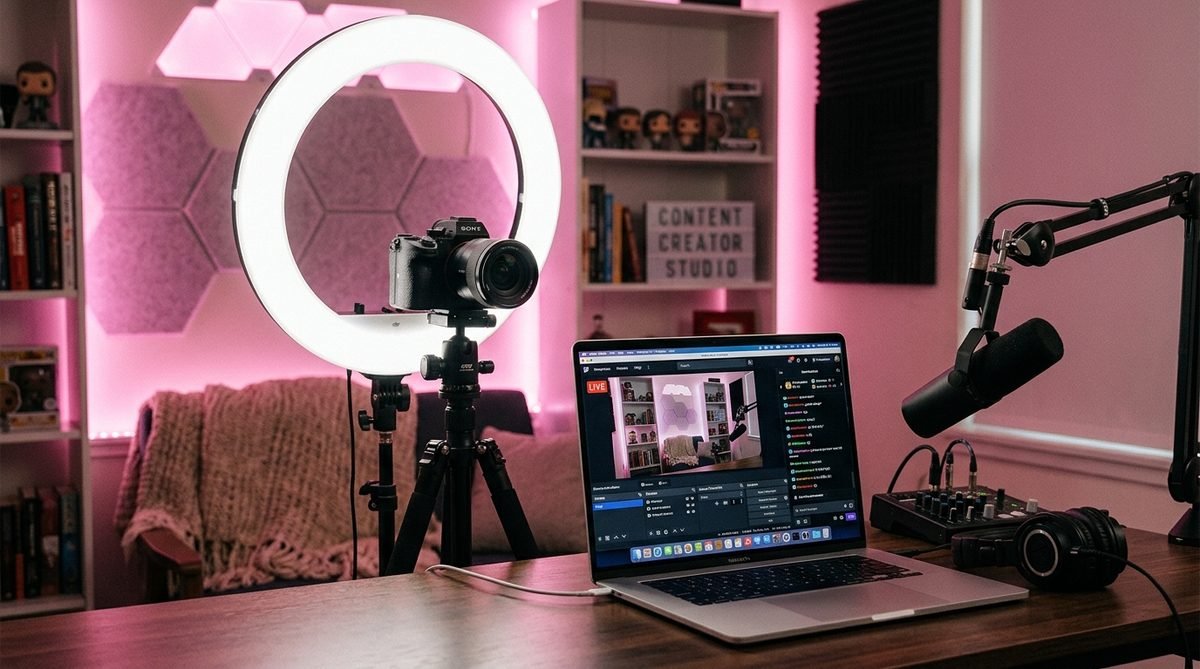
Camera: Your smartphone camera is perfectly fine for getting started, especially if you have a recent model with a high-quality front-facing lens. If you want to upgrade, a dedicated webcam like the Logitech C920 or C922 provides sharper video and better low-light performance. For creators who stream frequently and want top-tier quality, a mirrorless camera with an HDMI capture card offers the best image quality available.
Lighting: Good lighting is more important than an expensive camera. A ring light is the most popular choice among creators because it provides even, flattering illumination and eliminates harsh shadows. Position it directly in front of you at eye level. If you want a more cinematic look, add two softbox lights at forty-five-degree angles on either side. Avoid relying on overhead room lighting, which casts unflattering shadows under the eyes and chin.
Microphone: Built-in laptop and phone microphones pick up room echo and background noise. A USB condenser microphone like the Blue Yeti or Audio-Technica AT2020 dramatically improves your audio quality. If you prefer a smaller footprint, a lavalier clip-on microphone is an affordable alternative that keeps your hands free during the stream.
Internet speed: A stable internet connection is non-negotiable for live streaming. You need a minimum upload speed of 5 Mbps for a smooth broadcast, though 10 Mbps or higher is recommended for HD quality. Use a wired ethernet connection whenever possible. Wi-Fi is convenient but introduces the risk of signal drops and buffering that can frustrate viewers and cost you tips. Run a speed test before every stream to confirm your connection is strong enough.
Tripod or phone mount: Shaky, handheld footage looks unprofessional and tires your audience quickly. A simple tripod or adjustable phone mount keeps your framing steady and frees up your hands to interact with viewers naturally.
Planning Your Live Stream Content
Going live without a plan is one of the quickest ways to lose viewers. Even though live streams feel spontaneous, the most successful ones follow a loose structure that keeps the energy high and the audience engaged from start to finish.
Start by choosing a theme or topic for each stream. This could be a Q&A session where fans get to ask you anything, a behind-the-scenes look at your content creation process, a workout or cooking session, a themed event tied to a holiday or milestone, or a casual hangout where you chat with fans. Having a clear theme gives fans a reason to tune in and helps you stay focused during the broadcast.
Create a simple outline before going live. You do not need a script, but jot down three to five talking points or activities that you can fall back on if conversation slows down. For example, you might plan to open with a greeting and update, move into the main theme, take a break to read and respond to comments, and then close with a preview of upcoming content.
Timing matters as well. Analyze your audience data to find out when your subscribers are most active. If the majority of your fans are in a particular time zone, schedule your streams to align with their evenings or weekends. Consistency is equally important. If you commit to going live every Thursday at eight in the evening, your fans will start building that into their routine.
Consider the length of your stream carefully. Thirty to sixty minutes is the sweet spot for most creators. Shorter streams feel rushed and do not give enough time for tips to accumulate. Longer streams risk losing viewer attention unless you have a particularly engaging format. As you gain experience, you will develop a sense for how long your audience prefers to stick around.
Want a Personalized Live Streaming Strategy?
JP Management builds custom streaming schedules and content plans for every creator we manage. From equipment recommendations to monetization tactics, our team helps you turn live sessions into consistent revenue. Apply today and start streaming with a strategy.
Monetizing Your Streams
Live streaming on OnlyFans is not just about engagement. It is a direct revenue channel when you approach it strategically. There are several ways to turn your live sessions into meaningful earnings.
Tips during the stream: This is the most immediate form of live stream income. Encourage tips by setting a tip goal with a clear reward, such as reaching a certain amount to unlock a special activity or content drop. Acknowledge every tipper by name to create a positive feedback loop. Fans who feel recognized are far more likely to tip again and tip bigger amounts.
PPV replays: Not every subscriber will catch your stream in real time. Save your live recordings and offer them as pay-per-view content for fans who missed the session. This extends the earning potential of every single stream well beyond the live window. Price replays according to the length and exclusivity of the content, typically between five and twenty dollars depending on your audience.
Exclusive streams for top fans: Consider offering premium live sessions that are only available to your highest-spending subscribers or to fans who purchase a special ticket. These exclusive streams create a sense of VIP access and justify a higher price point. You can promote them in advance through your regular feed to build anticipation.
Tip menus during streams: Create a tip menu that lists specific actions or interactions at different price levels. Display it at the beginning of your stream so viewers know exactly what their tips can unlock. This gamification element drives significantly more tip volume compared to streams without a clear menu.
Promoting other content: Use your live stream as a launchpad for other paid content. Tease a new photo set, mention an upcoming PPV drop, or offer a limited-time discount on your subscription to viewers who are not yet subscribed. The live format makes these promotions feel natural rather than salesy.
Engaging Your Audience During Streams
The biggest advantage of live streaming over pre-recorded content is the ability to interact with fans in real time. How well you engage your audience during a stream directly affects how long they stay, how much they tip, and whether they come back for the next one.
Start by greeting viewers as they enter the stream. Use their usernames, welcome them individually, and ask how their day is going. This small gesture makes fans feel seen and valued, which is exactly the experience they are paying for on a platform like OnlyFans.
Read the chat actively and respond to comments and questions throughout the broadcast. Do not let the chat scroll by unacknowledged. If the chat moves too fast, pick out interesting questions or comments and address them directly. Fans who ask a question and hear you answer it on camera develop a much stronger connection to your page.
Use interactive elements to keep the energy up. Polls, challenges, and viewer-driven decisions make the audience feel like they are part of the show rather than passive spectators. For example, you could let fans vote on what you do next, answer rapid-fire questions, or set a group tip goal that unlocks a special activity for everyone watching.
Be authentic and do not try to perform a character. Viewers are drawn to live streams precisely because they feel real. Laugh at your own mistakes, share genuine reactions, and let your personality come through naturally. The creators who perform best on live are the ones who treat it like a conversation with friends, not a televised broadcast.
Best Practices for Professional Streams
Professionalism during live streams does not mean being stiff or corporate. It means presenting yourself in a way that reflects the quality your subscribers expect when they pay for your content. Here are the practices that separate amateur streams from professional ones.
Set the scene. Your background matters more than you think. A cluttered room or messy bed distracts viewers and undermines the premium feel of your content. Choose a clean, well-decorated background or use a plain backdrop. Some creators invest in LED strip lights or neon signs to create a visually distinctive streaming environment.
Dress and present intentionally. Even in a casual stream, put thought into your appearance. Looking like you prepared for the session signals to fans that they are getting something special, not just a random broadcast you decided to do on a whim.
Manage your energy. Live streams require sustained energy for the entire duration. If you typically stream for an hour, make sure you are rested, hydrated, and in a positive mindset before you start. Your energy sets the mood for the entire chat. If you seem tired or distracted, viewers will leave early.
Have a backup plan for technical issues. Internet drops, camera freezes, and audio glitches happen to everyone. Prepare for them by having your phone ready as a backup streaming device, keeping a portable hotspot charged, and knowing how to quickly restart your stream if something goes wrong. Handling technical hiccups smoothly actually builds viewer confidence in you as a professional creator.
Follow platform guidelines. Make sure every stream complies with OnlyFans terms of service. Familiarize yourself with the rules regarding live content, and never put your account at risk by violating platform policies during a broadcast. A single policy violation could result in restrictions that affect your ability to stream in the future.
Common Live Streaming Mistakes
Even experienced creators make mistakes during live streams that cost them viewers and revenue. Being aware of these common pitfalls helps you avoid them before they become habits.
Going live without promotion. If you do not tell your subscribers in advance that you plan to stream, most of them will miss it. Post about your upcoming stream on your feed, in stories, and through direct messages at least twenty-four hours before going live. The more anticipation you build, the larger your initial viewer count will be.
Ignoring the chat. Nothing kills a live stream faster than a creator who talks at the camera without acknowledging the people watching. If fans feel like they could be watching a recording, they will leave. Make interaction the core of every stream, not an afterthought.
Poor audio quality. Viewers will tolerate slightly imperfect video, but they will not stick around for bad audio. Echoing rooms, background noise, and muffled speech make your stream unpleasant to watch. Invest in a decent microphone and test your audio before every session.
Streaming too long without a plan. A two-hour stream with no structure feels like a marathon for viewers. It is better to deliver a tight, engaging forty-five-minute stream than a meandering two-hour one. Respect your audience's time and they will reward you with higher engagement per minute.
Neglecting the recording. Forgetting to save your live stream means losing content that could be repurposed as PPV replays or clips for promotion. Always enable recording before you start and download the file after you end the session.
Inconsistent scheduling. Going live sporadically makes it impossible for fans to plan around your streams. Pick a regular day and time, communicate it clearly, and stick to it. Consistency trains your audience to show up, which compounds your viewership over time.
How JP Management Supports Live Content
Live streaming is a skill, and like any skill, it improves faster with expert guidance. At JP Management, we help our creators develop live content strategies that are tailored to their audience, niche, and comfort level.
Our account management team works with each creator to build a streaming schedule that complements their overall content calendar. We help identify the best times to go live based on subscriber activity data, recommend themes and formats that drive the highest engagement, and provide real-time support during streams when needed.
On the monetization side, we analyze tip patterns, replay sales, and viewer retention data from every stream to refine your approach over time. Our creators know exactly what is working and what needs adjustment, which eliminates the guesswork that slows down independent creators.
We also handle the promotional side of live streaming. Building hype before a stream, crafting compelling announcements, and following up with fans who missed the session are all part of the managed experience. When you partner with JP Management, live streaming becomes a reliable revenue pillar, not an occasional experiment.
Whether you are going live for the first time or looking to take your streams to the next level, having a professional team behind you makes the process smoother and more profitable. The creators who invest in learning how to stream effectively are the ones who build sustainable, high-earning careers on the platform.
Ready to Go Live with Professional Support?
JP Management helps creators plan, execute, and monetize live streams that drive real revenue. From equipment guidance to audience engagement strategies, our team ensures every broadcast works harder for your career. Apply now and start streaming like a pro.